Building an AI Powered Quant Research Assistant with Quantpedia API
Artificial intelligence is gradually changing the way quantitative researchers interact with financial data. Instead of manually browsing databases, comparing strategies one by one and filtering spreadsheets, modern research workflows increasingly rely on conversational systems capable of retrieving and summarizing structured information automatically.
One practical application is combining the Quantpedia API with an LLM such as ChatGPT, Claude or Cursor AI to create a lightweight quant research assistant. In this setup, Quantpedia API provides structured access to quantitative trading strategies, performance metrics, classifications, equity curves, trading codes, and related research metadata through the official Quantpedia API, while the LLM acts as a conversational layer capable of interpreting the retrieved data and transforming it into readable research outputs.
As a result, users can interact with the strategy database through natural language prompts such as:
Find commodity related strategies with Sharpe > 1.or:
Compare crisis hedge strategies.Instead of manually filtering hundreds of strategy pages, the system retrieves relevant strategies, summarizes their characteristics and produces a concise research style response.
Why This Workflow Matters
Modern quantitative research increasingly suffers from information overload rather than lack of information. Researchers often work with hundreds of strategies, overlapping categories, multiple performance metrics and large collections of academic papers. While structured databases solve the problem of data availability, navigating and contextualizing this information still requires substantial manual effort.
This is where the combination of structured APIs and LLMs becomes useful. Quantpedia API provides machine readable strategy information while the LLM layer transforms raw API responses into readable summaries, comparisons and contextual observations. Instead of navigating the database manually, researchers can focus directly on interpretation and portfolio construction.
Step 1 – Requesting Quantpedia API Access
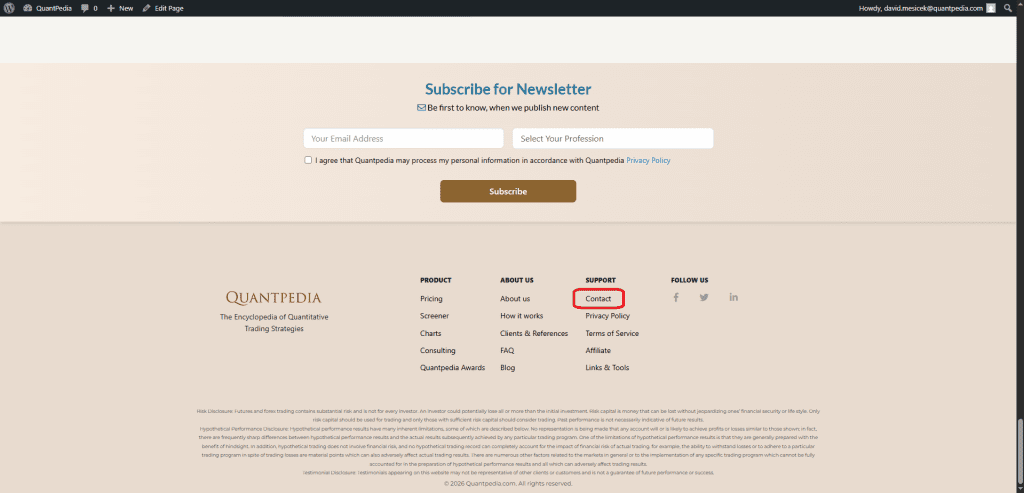
Access to the Quantpedia API is available through direct API access requests. Quantpedia Pro users interested in API connectivity can request access through the Quantpedia contact section, after which API credentials linked to the Quantpedia account are provided for authentication and integration purposes.
Step 2 – Creating the Project in Cursor AI
For this example we used Cursor AI as the coding assistant. A new empty project folder was opened directly inside Cursor and used as a lightweight development environment for the proof of concept.
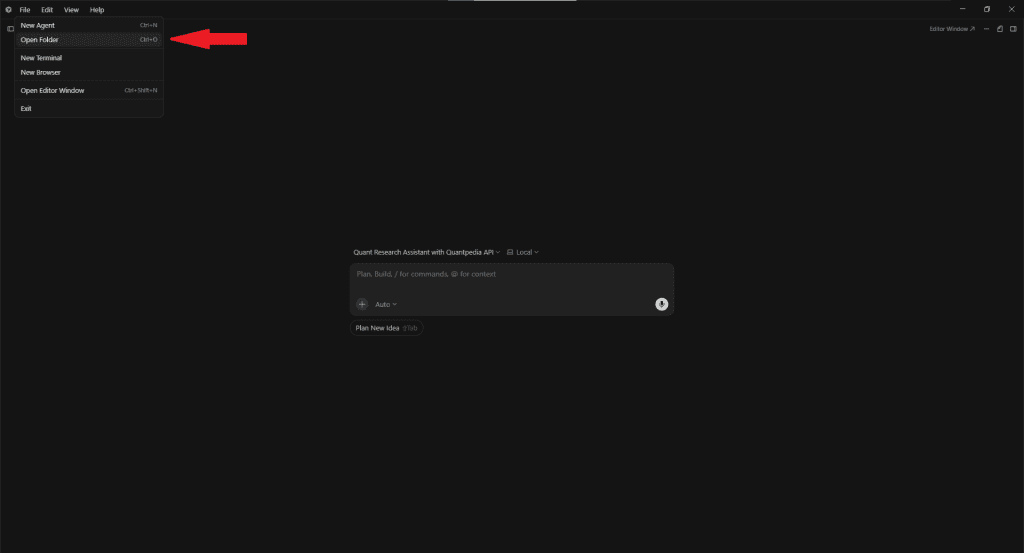
The goal was not to build a production ready platform but rather to demonstrate how quickly a simple AI powered research assistant can be assembled by combining Quantpedia API with a modern coding agent.
Step 3 – Prompting Cursor to Build the Assistant
Instead of manually implementing the entire codebase, the workflow relied on a structured implementation prompt describing the intended behavior of the assistant.
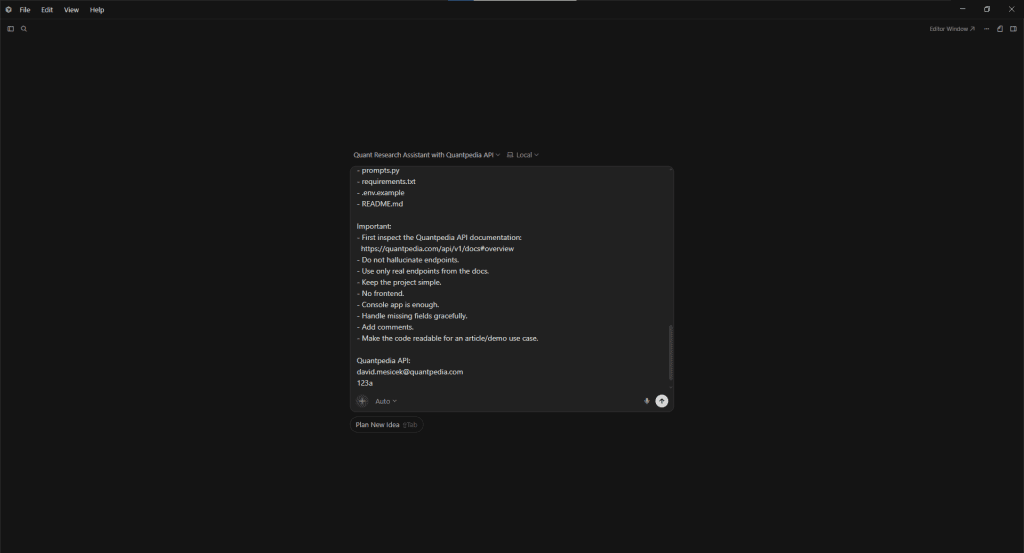
The prompt instructed Cursor to connect the Quantpedia API with OpenAI, retrieve strategy metadata, filter strategies according to selected metrics and generate concise research style summaries directly in the console output.
The full implementation prompt used in Cursor was:
Create a minimal Python demo project for an AI-powered quant research assistant using the Quantpedia API.
The goal is to show how an LLM can use the Quantpedia API as a structured research database.
The assistant should:
- connect to Quantpedia API,
- retrieve quantitative trading strategies,
- extract strategy metadata,
- extract strategy details,
- retrieve performance/equity curve data if available,
- filter strategies by metrics,
- summarize paper abstracts and strategy descriptions,
- compare categories,
- and generate a concise research-style answer through OpenAI.
Use case:
User asks:
“Find commodity strategies with Sharpe > 1 and max drawdown < 15%.”
The script should:
- call Quantpedia API,
- get available strategies,
- fetch strategy details,
- extract:
- strategy name,
- category,
- market factors,
- Sharpe ratio,
- max drawdown,
- paper abstract,
- description,
- performance data if available,
- filter results,
- send compact JSON context to OpenAI,
- print final research summary in the console.
Use:
- Python
- requests
- python-dotenv
- OpenAI API
- HTTP Basic Auth for Quantpedia API
Base URL:
https://quantpedia.com/api/v1
Authentication:
Use username + API key with HTTP Basic Auth.
Project files:
- main.py
- quantpedia_client.py
- llm_assistant.py
- prompts.py
- requirements.txt
- .env.example
- README.md
Important:
- First inspect the Quantpedia API documentation:
https://quantpedia.com/api/v1/docs#overview - Do not hallucinate endpoints.
- Use only real endpoints from the docs.
- Keep the project simple.
- No frontend.
- Console app is enough.
- Handle missing fields gracefully.
- Add comments.
- Make the code readable for an article/demo use case.
Quantpedia API:
[Quantpedia username/email]
[API key]
The implementation request additionally instructed Cursor to inspect the official API documentation first, avoid hallucinated endpoints and keep the overall architecture simple and readable.
Step 4 – Automatic Project Generation
Cursor subsequently generated the initial project structure automatically.
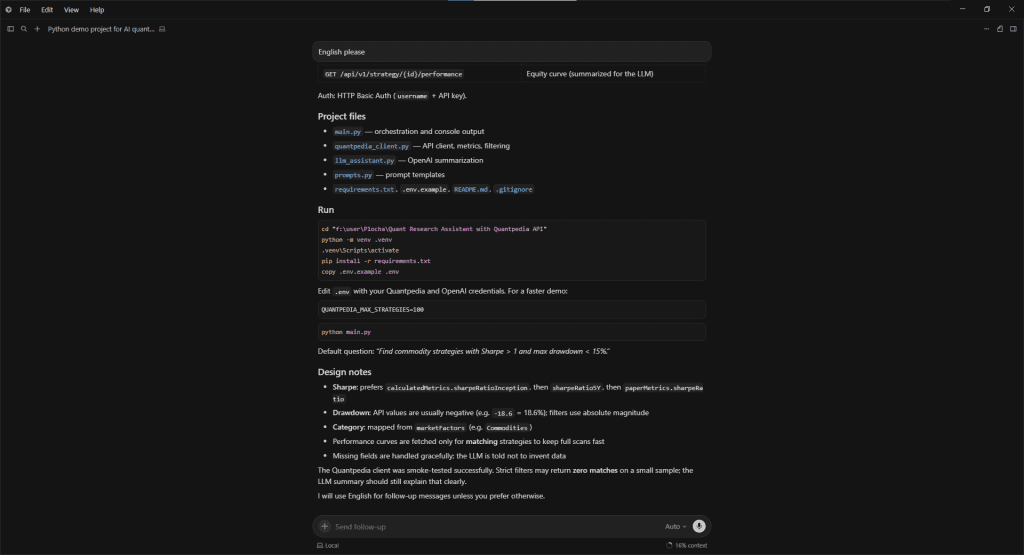
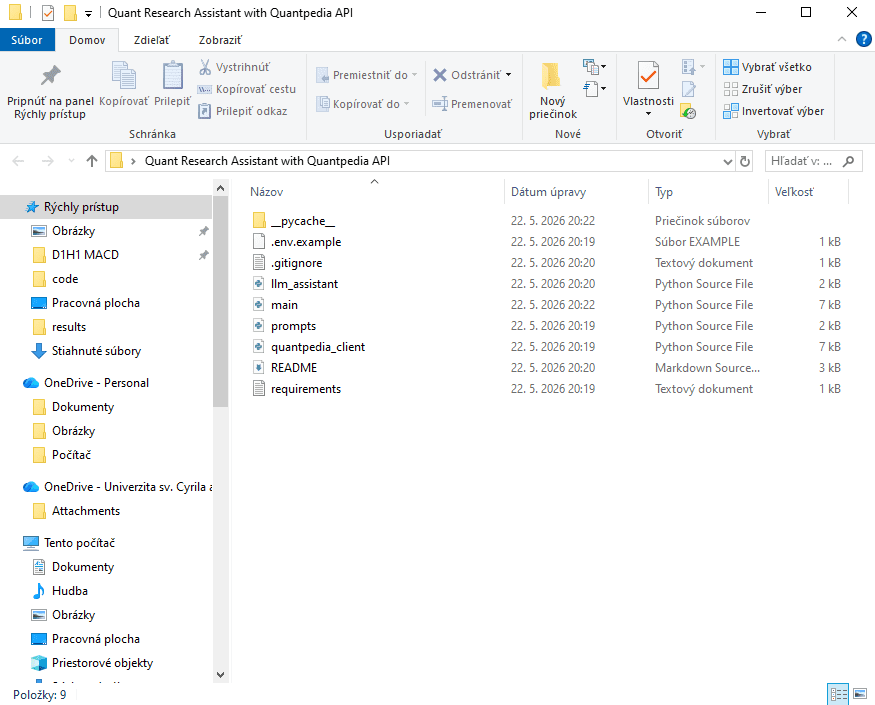
The generated files included the API client, OpenAI integration, prompt handling logic and a lightweight console interface for interacting with the assistant. Even though the implementation remained intentionally simple, the resulting structure was already sufficient for practical experimentation and testing.
This illustrates one of the larger productivity shifts introduced by modern coding agents. Instead of spending time creating boilerplate infrastructure manually, researchers can focus more directly on workflow design, filtering logic and research interpretation.
Step 5 – Testing the AI Research Workflow
The first test focused on identifying commodity related strategies with elevated risk adjusted returns.
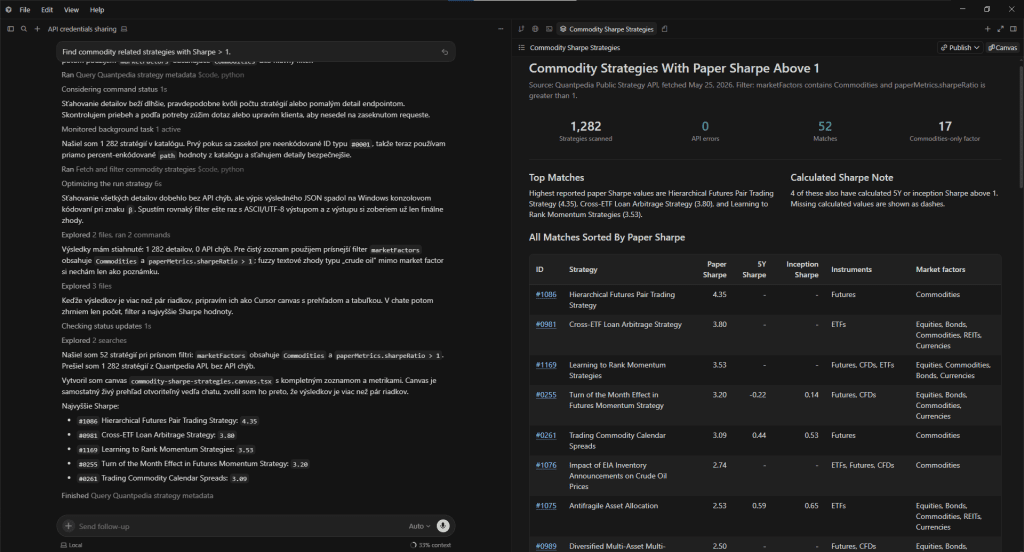
The assistant scanned the Quantpedia strategy universe, retrieved matching strategies and generated a structured research summary.
The assistant scanned the Quantpedia strategy universe and retrieved all strategies tagged with commodity exposure while filtering for paper Sharpe ratios above 1. The resulting shortlist contained 52 matching strategies spanning multiple implementation styles, instruments and diversification profiles.
The generated output highlighted several high Sharpe commodity related approaches, including futures pair trading strategies, commodity calendar spreads, cross ETF arbitrage systems and diversified multi asset allocation models with commodity exposure. The comparison additionally demonstrated how commodity related strategies can differ substantially in terms of implementation complexity, instrument selection and broader portfolio integration.
One of the more interesting observations was that only a relatively small subset of the retrieved strategies represented pure commodity exposure. Many higher Sharpe strategies instead combined commodities with equities, bonds, currencies or alternative asset allocation overlays. This illustrates how commodity exposure is often incorporated as part of broader multi asset diversification frameworks rather than as a standalone return driver.
Instead of returning only raw API results, the LLM layer transformed the retrieved metadata into a readable research oriented shortlist capable of summarizing large segments of the strategy universe in a conversational format.
Step 6 – Comparing Crisis Hedge Strategies
The second test focused on crisis hedge classifications across the Quantpedia database.

The assistant analyzed strategies tagged as crisis hedge, partially crisis hedge, probably crisis hedge, unlikely or unknown and generated a cross sectional comparison across the entire strategy universe.
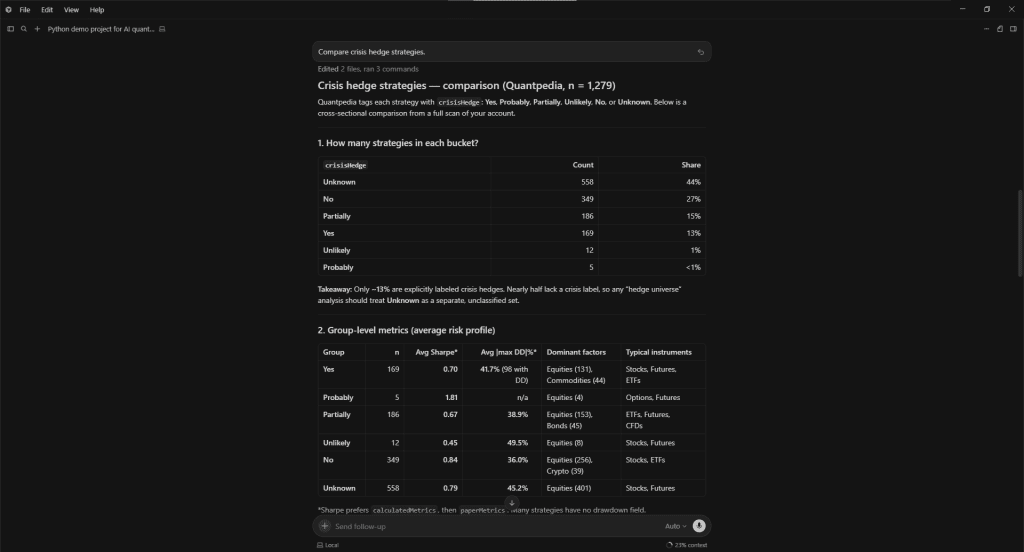
The generated analysis compared category distributions, average Sharpe ratios, drawdown profiles and dominant market exposures across the individual crisis hedge groups. The assistant additionally identified several distinct crisis hedge archetypes, including volatility based tail hedges, CTA and trend following systems, defensive allocation overlays and bond oriented defensive strategies.
One of the more interesting observations was that many explicitly labeled crisis hedge strategies exhibited lower standalone Sharpe ratios than traditional non hedge strategies. The generated explanation correctly emphasized that crisis hedges are designed primarily for stress period diversification rather than maximizing long term return efficiency.
This demonstrates how LLMs can transform raw quantitative metadata into higher level portfolio construction insights that would otherwise require substantial manual interpretation.
Why This Approach Is Interesting
Although this example intentionally remains lightweight, the broader implications are significant. The workflow effectively transforms Quantpedia into a conversational research database where users can screen strategies, compare categories, summarize papers and retrieve portfolio relevant information using natural language prompts.
Instead of manually navigating hundreds of strategy pages, researchers can interact with the database through conversational queries and rapidly iterate over filtering conditions, strategy universes and portfolio themes.
Such workflows may eventually become useful building blocks for AI research copilots, portfolio screening systems, internal RAG pipelines or automated investment research assistants.
Author: David Mesicek, Junior Quant Analyst, Quantpedia
Are you looking for more strategies to read about? Sign up for our newsletter or visit our Blog or Screener.
Do you want to learn more about Quantpedia Premium service? Check how Quantpedia works, our mission and Premium pricing offer.
Do you want to learn more about Quantpedia Pro service? Check its description, watch videos, review reporting capabilities and visit our pricing offer.
Do you want algorithmic access to the full Quantpedia database via the API? Subscribe to Quantpedia Pro, ask for an API key, and explore the in/out-of-sample statistics, source academic papers, and code snippets — ideal for quantitative research, systematic trading workflows, and AI model training.
Are you looking for historical data or backtesting platforms? Check our list of Algo Trading Discounts.
Or follow us on:
Facebook Group, Facebook Page, Telegram, Twitter, Linkedin, Medium or Youtube
Share onLinkedInTwitterFacebookRefer to a friend