Evaluating a trading strategy is rarely just a question of whether its equity curve goes up. A strategy can have positive performance and still be unattractive if it is highly correlated with strategies that are already in the portfolio. On the other hand, a strategy with only moderate standalone performance can still be useful if it behaves differently from the rest of the investment universe and improves diversification.
This is the main idea behind Strategy Grading. The standard Quantpedia Strategy Grading report evaluates a selected model portfolio through two dimensions: risk-adjusted performance and correlation to the selected universe. In our case study, we first use the existing Quantpedia product report and then extend the same logic through the Quantpedia API, where the investment universe can be customized.
The first metric is the adjusted Sharpe ratio. Since cash performance is assumed to be 0%, the adjusted Sharpe ratio is calculated simply as annualized performance divided by annualized volatility. The second metric is average correlation. For each strategy, we calculate its correlation with every other strategy in the selected universe and then take the average.
In practical terms, if we have ten assets, we take one asset, calculate its correlation with the other nine assets, and average those nine values. This gives us one value for the correlation axis. The adjusted Sharpe ratio gives us the performance axis. Each strategy can then be plotted as one point in a Strategy Grading scatter plot.
The goal is not only to ask whether a strategy performed well. The more useful question is whether the strategy performed well in a way that is relevant and differentiated compared with its peers.
The first step is to use the existing Quantpedia Strategy Grading report directly inside the Quantpedia product. This gives the user a fast diagnostic view without any programming. A selected model portfolio can be compared against predefined investment universes, such as ETFs or Quantpedia strategies.
For this case study, we use WTMF ETF (WisdomTree Managed Futures Strategy Fund) as the model portfolio. The report places WTMF into a Sharpe vs. Correlation chart, where each point represents an asset or strategy from the selected universe. The black point represents WTMF, while the other points represent the comparison universe.
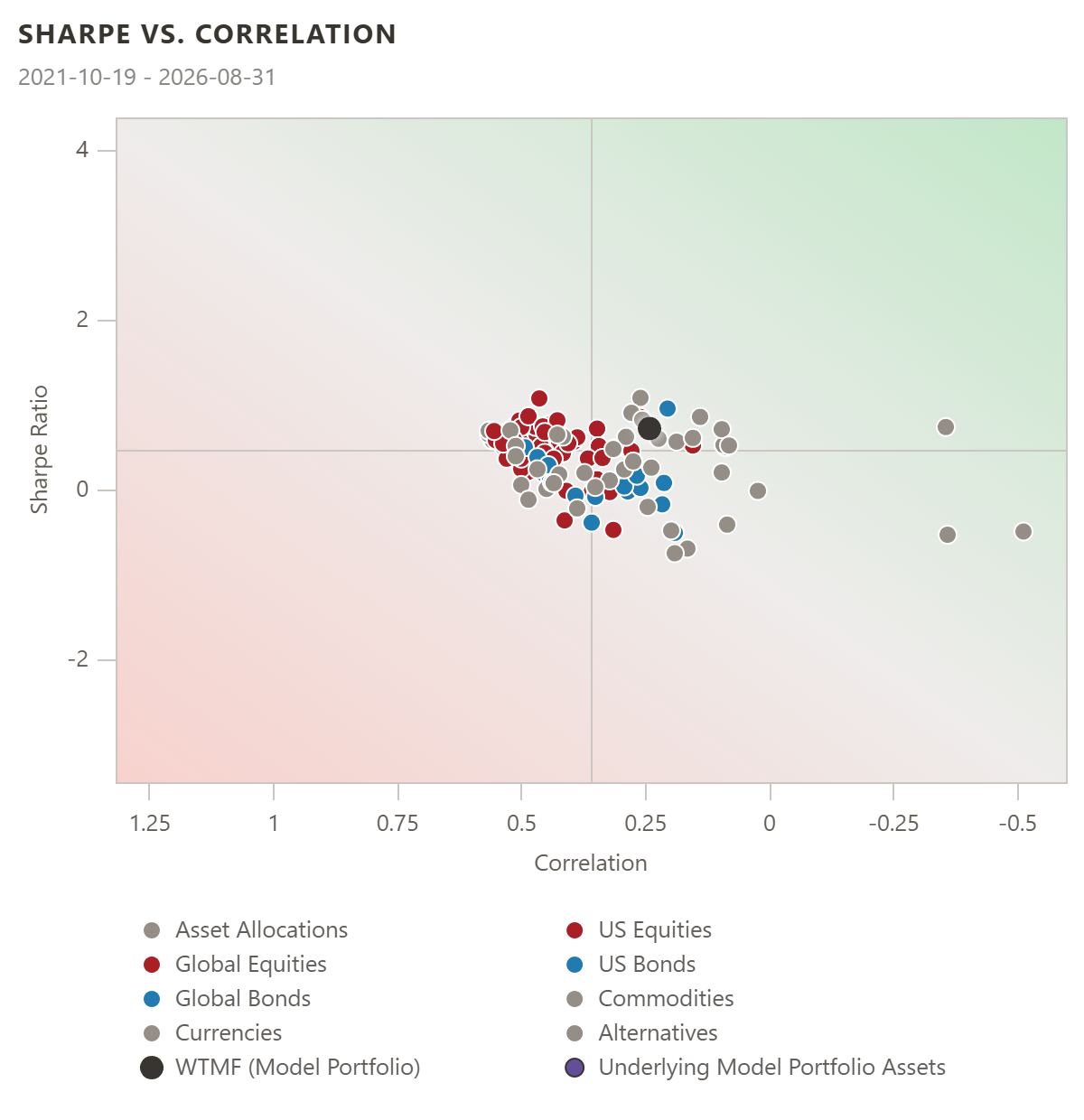
The first chart compares WTMF against the asset universe. This is useful as a broad product-level diagnostic because WTMF does not have to be judged in isolation. It can immediately be compared with assets from multiple categories, such as asset allocation, equities, bonds, commodities, currencies, and alternatives.
The interpretation is straightforward. A higher Sharpe ratio is better from a standalone risk-adjusted performance perspective. Lower average correlation is better from a diversification perspective. The most attractive strategies are therefore those that combine strong risk-adjusted performance with lower overlap against the rest of the universe.
The same report can also compare WTMF against the Quantpedia strategies universe. This changes the benchmark. Instead of asking how WTMF looks relative to broad ETF categories, we ask how it looks relative to systematic trading strategies.
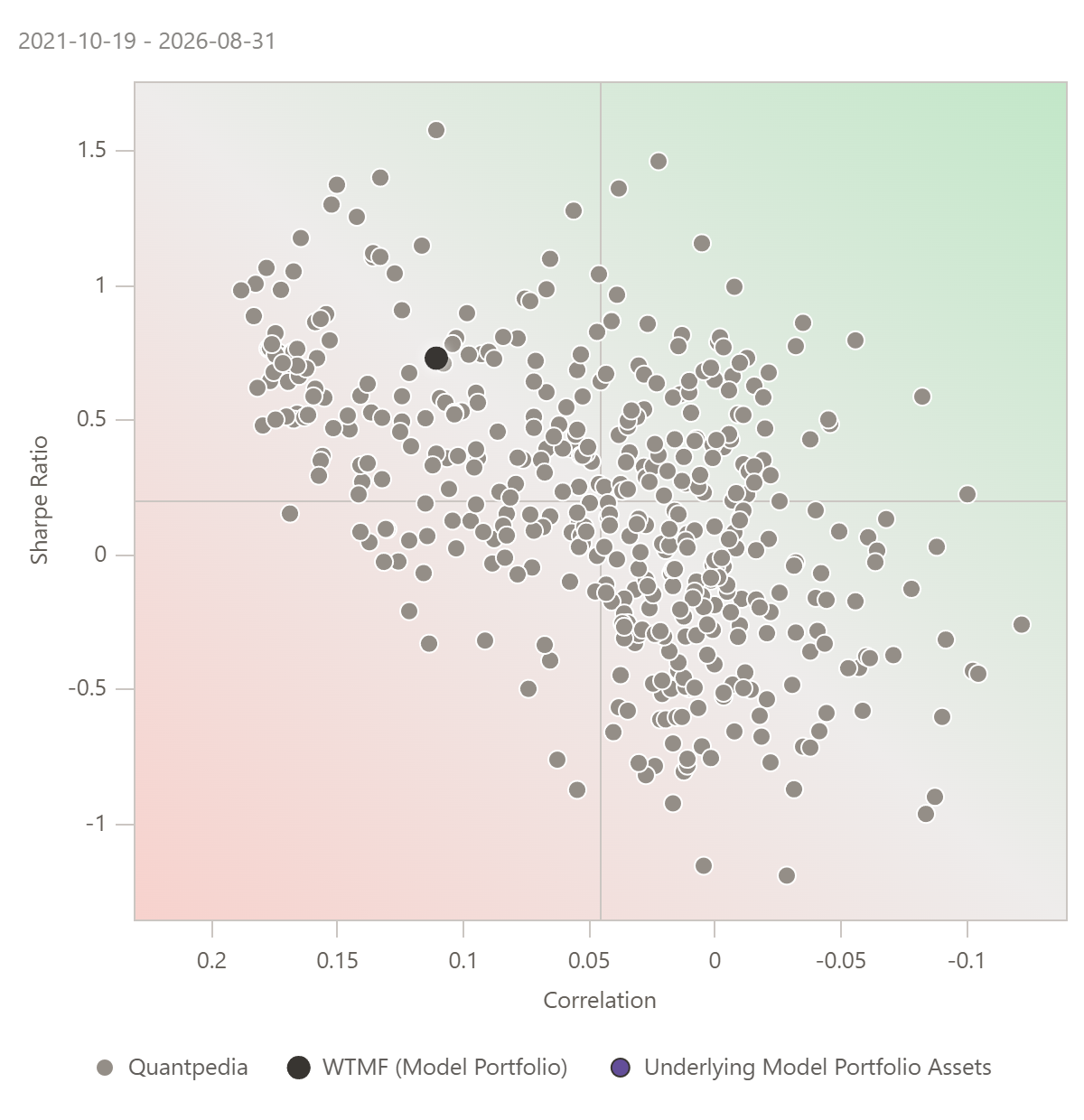
This second view is especially useful for quant research. It places WTMF into a strategy-oriented context and allows the user to compare it with a much broader set of systematic strategies. The visual logic remains the same, but the interpretation becomes more research-specific because the comparison universe is different.
The standard report is already valuable. It answers the first practical question: how does the selected model portfolio look inside the predefined Strategy Grading universes?
However, many research questions require a more specific comparison. A managed futures ETF does not necessarily need to be compared with all ETFs or all Quantpedia strategies. A more precise question is how WTMF compares with a custom peer group of trend-following, ETF-based, monthly rebalanced strategies with a sufficiently long history.
This is where the Quantpedia API becomes useful.
The standard Strategy Grading report is fast and convenient, but its universes are predefined. The API version gives the researcher more flexibility because the peer group can be customized. Instead of using a fixed universe, we can define the investment universe according to the exact research question.
In this case study, the custom universe was built from Quantpedia strategies that satisfy a specific economic logic: ETF-based instruments, trend-following relevance, monthly rebalancing, available performance data, and at least ten years of history. The final test run selected 44 strategies, and all 44 remained after overlap filtering.
The workflow then adds WTMF as the tested model portfolio and evaluates it against this custom peer group.
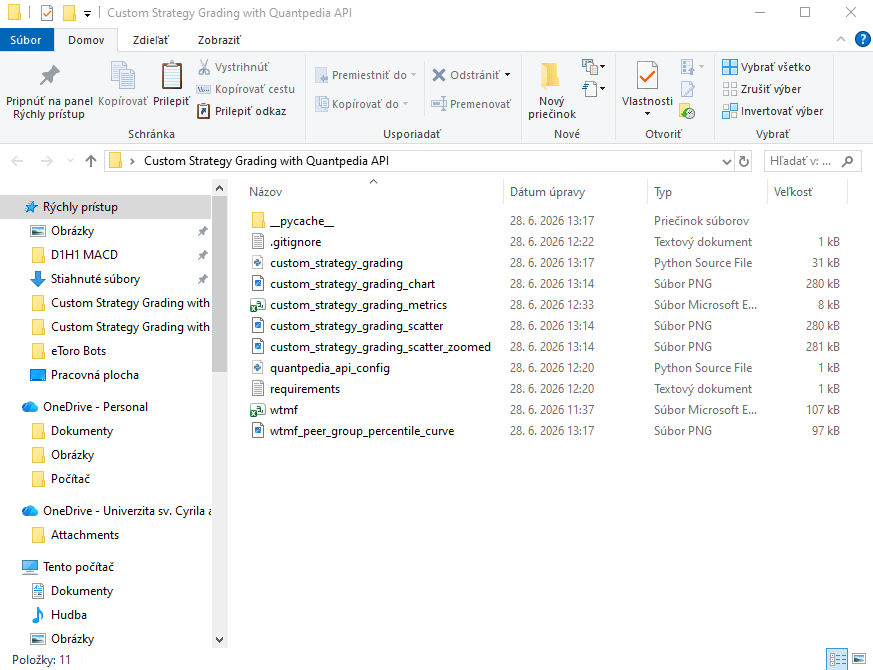
The API workflow was organized as a reproducible local project. The folder contains the WTMF input file, the main Python workflow, API configuration, requirements file, exported metrics table, and generated Strategy Grading charts. This makes the analysis easy to rerun with another ETF, strategy, or peer group definition.
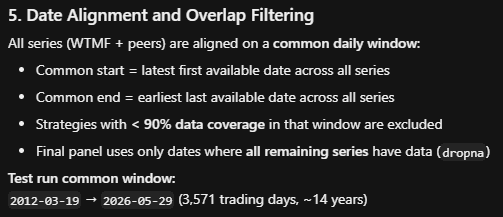
Date alignment is an important part of the process. All return series must be compared on the same daily window. In this test run, the common period was from 2012-03-19 to 2026-05-29, covering 3,571 trading days and approximately 14 years of data. This satisfies the minimum 10-year history requirement and avoids comparing strategies over inconsistent time windows.
For each strategy in the peer group, the workflow calculates annualized return, annualized volatility, adjusted Sharpe ratio, average correlation, number of observations, start date, and end date. The same calculations are applied to WTMF. The adjusted Sharpe ratio is calculated as annualized return divided by annualized volatility, with no risk-free rate subtraction. The average correlation is calculated as the average pairwise correlation against the other members of the peer group. For WTMF, it is calculated against all peer strategies.
The result is a custom Strategy Grading chart.
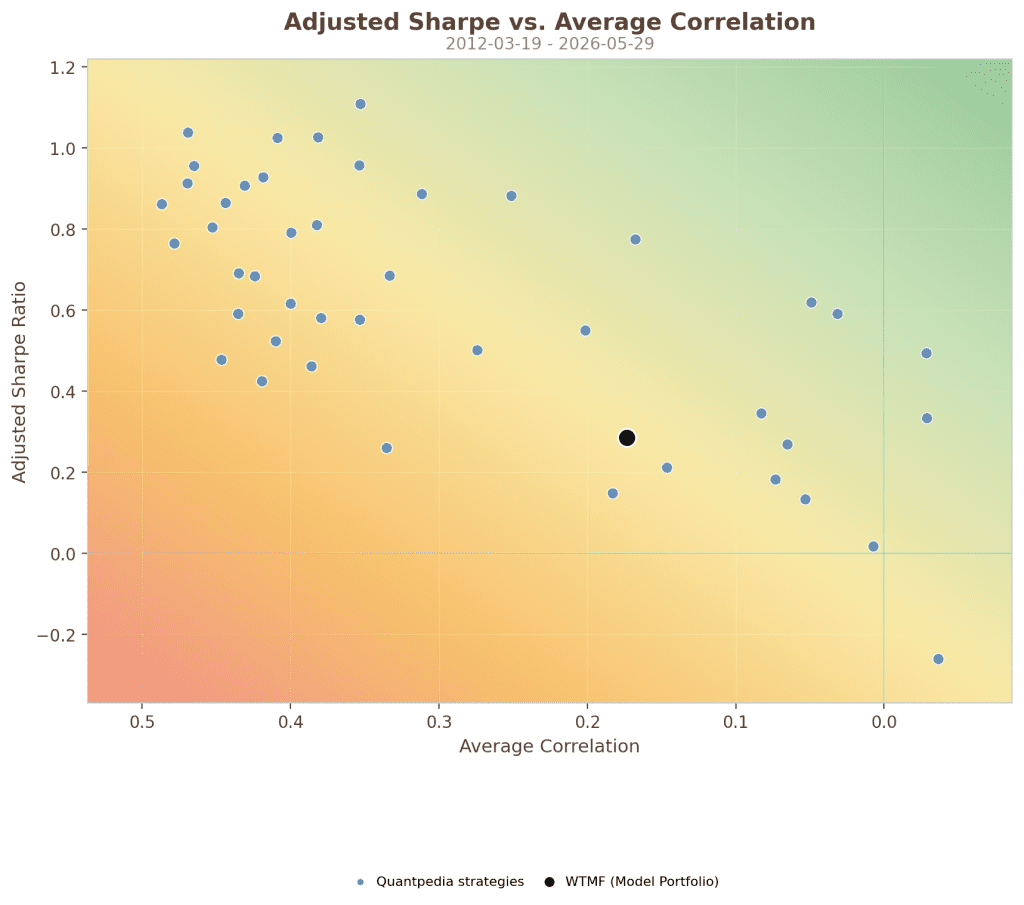
This chart replicates the logic of the Strategy Grading report, but with a custom investment universe. Each blue point is a Quantpedia strategy from the selected peer group, while the black point is WTMF. The X-axis shows average correlation and the Y-axis shows adjusted Sharpe ratio.
One detail is important when reading this chart. In this visualization, the correlation axis is displayed in descending order, meaning that lower average correlation appears more to the right. Therefore, the most attractive area is the upper-right part of this specific chart: higher adjusted Sharpe ratio and lower average correlation. The economic logic is the same as in the standard report, but the visual orientation follows the chosen axis direction.
WTMF appears with an adjusted Sharpe ratio of approximately 0.285 and an average correlation of approximately 0.173. This means that WTMF is not among the strongest strategies from a pure risk-adjusted performance perspective, but it has a relatively useful correlation profile compared with the selected peer group.
A zoomed version of the chart makes the peer group distribution easier to read.
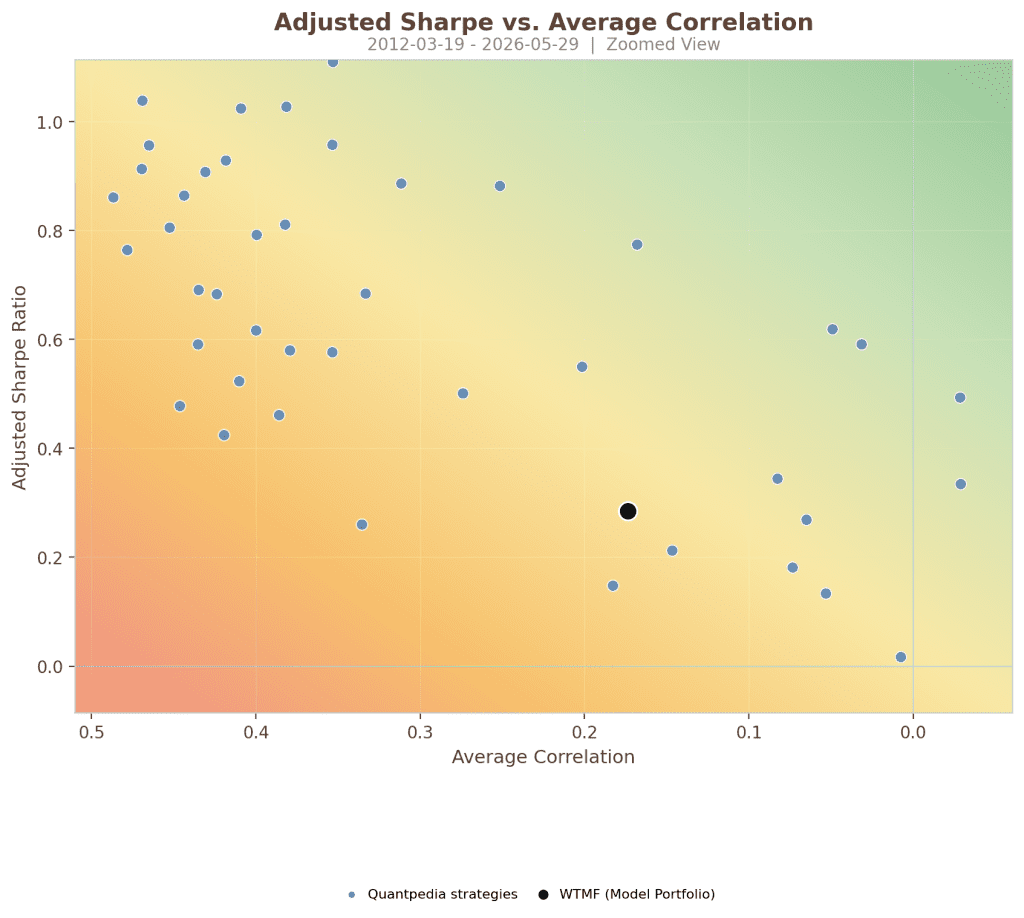
The zoomed view is useful because it focuses on the main body of the peer group and makes the relative position of WTMF clearer. The API workflow is not only recreating an existing chart. It is creating a research tool that can be modified. The user can change the peer group definition, remove or add filters, use another ETF or strategy instead of WTMF, and rerun the same grading logic.
This is the main advantage of the API version. The standard report answers a predefined comparison question. The API workflow allows the user to define the comparison universe.
The scatter plot gives the two-dimensional view, but the percentile curve gives a simpler ranking perspective. In this case, WTMF is placed on the adjusted Sharpe ratio percentile curve of the custom Quantpedia peer group.
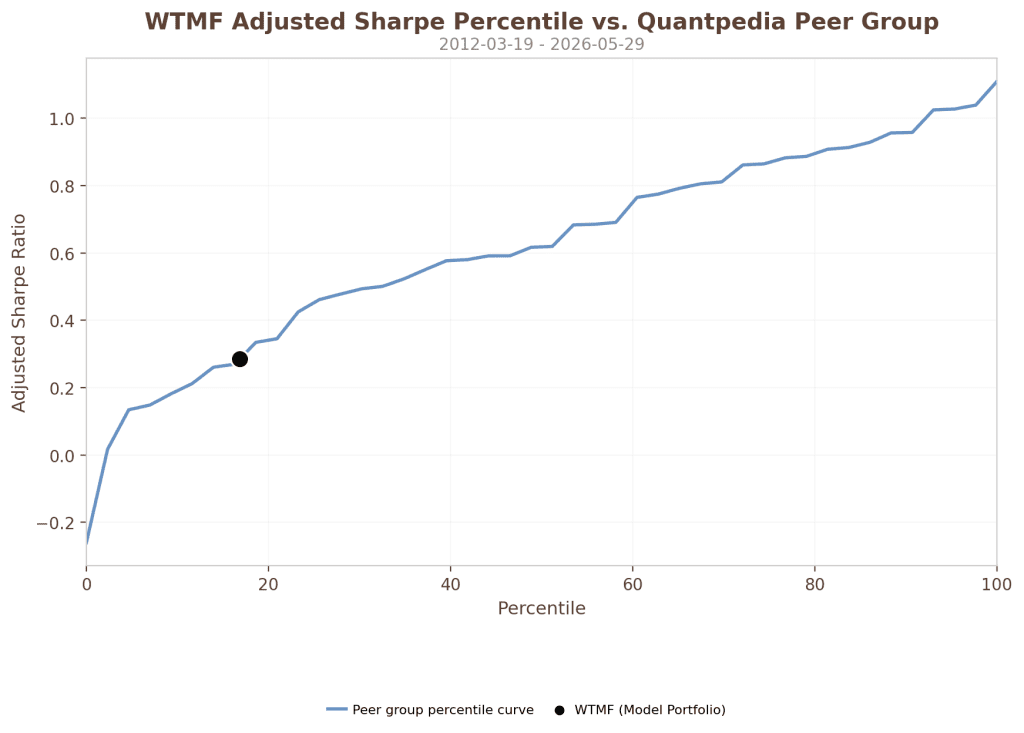
WTMF is around the 18th percentile by adjusted Sharpe ratio within this custom peer group. This confirms that its standalone risk-adjusted performance is below many of the selected Quantpedia peer strategies. However, its correlation profile is more favorable. The diagnostic summary shows WTMF average correlation at approximately 0.173 and a correlation percentile of 72.7 when lower correlation is treated as better.
This is exactly the type of insight that a Strategy Grading workflow should provide. A strategy can be weak on one dimension and still useful on another. WTMF does not dominate the peer group by adjusted Sharpe ratio, but its correlation profile may still make it relevant as a diversifying component.
For portfolio construction, this distinction matters. A researcher may decide that WTMF is not attractive enough as a standalone allocation. Another researcher may still find it useful if the objective is diversification rather than maximum standalone Sharpe ratio. The point is that the grading framework makes this trade-off visible.
The Quantpedia product report is the right starting point. It is fast, visual, and immediately useful. It gives users a ready-made Strategy Grading diagnostic against standard universes.
The API workflow adds a second layer. It allows users to define their own peer group and ask a more precise research question. Instead of comparing WTMF against all ETFs or all Quantpedia strategies, we can compare it only against strategies that match a specific investment style.
This flexibility is useful in many cases. A researcher can build a peer group of trend-following strategies, arbitrage strategies, value stock-picking strategies, growth stock-picking strategies, crypto strategies, or any other economically meaningful subset available through Quantpedia metadata. The same framework can then be used to evaluate any candidate strategy, ETF, fund, or internally developed trading model.
The workflow also improves reproducibility. The data are loaded systematically, returns are normalized, performance series are aligned on a common date range, insufficient histories are filtered out, and the metrics are exported into a CSV file. The final chart is not a manually created visualization. It is the output of a repeatable API-based research process.
This makes the Strategy Grading idea more powerful. It is no longer only a fixed report. It becomes a flexible framework for strategy diagnostics.
Strategy quality cannot be judged only by return. A useful strategy should be evaluated in context. It should have reasonable risk-adjusted performance, and it should also add something different from the existing investment universe.
The standard Quantpedia Strategy Grading report provides a fast way to perform this diagnostic inside the product. It shows where a selected model portfolio stands relative to predefined universes. The API workflow extends the same logic by allowing the user to create a custom peer group and rerun the analysis on a more relevant comparison set.
In this case study, WTMF was first reviewed through the standard Strategy Grading report and then evaluated through a custom Quantpedia API workflow against 44 trend-following, ETF-related, monthly rebalanced peer strategies over a common history of approximately 14 years. The result shows that WTMF has a modest adjusted Sharpe ratio relative to this peer group, but a more favorable correlation profile.
This is the practical value of custom Strategy Grading. It does not reduce strategy evaluation to a single number. It helps the researcher understand whether a strategy is attractive, redundant, diversifying, or simply average within the peer group that actually matters.
Author: David Mesicek, Junior Quant Analyst, Quantpedia
Are you looking for more strategies to read about? Sign up for our newsletter or visit our Blog or Screener.
Do you want to learn more about Quantpedia Premium service? Check how Quantpedia works, our mission and Premium pricing offer.
Do you want to learn more about Quantpedia Pro service? Check its description, watch videos, review reporting capabilities and visit our pricing offer.
Do you want algorithmic access to the full Quantpedia database via the API? Subscribe to Quantpedia Pro, ask for an API key, and explore the in/out-of-sample statistics, source academic papers, and code snippets — ideal for quantitative research, systematic trading workflows, and AI model training.
Are you looking for historical data or backtesting platforms? Check our list of Algo Trading Discounts.
Or follow us on:
Facebook Group, Facebook Page, Telegram, Twitter, Linkedin, Medium or Youtube
Share onLinkedInTwitterFacebookRefer to a friend